
Three engines, one lesson #
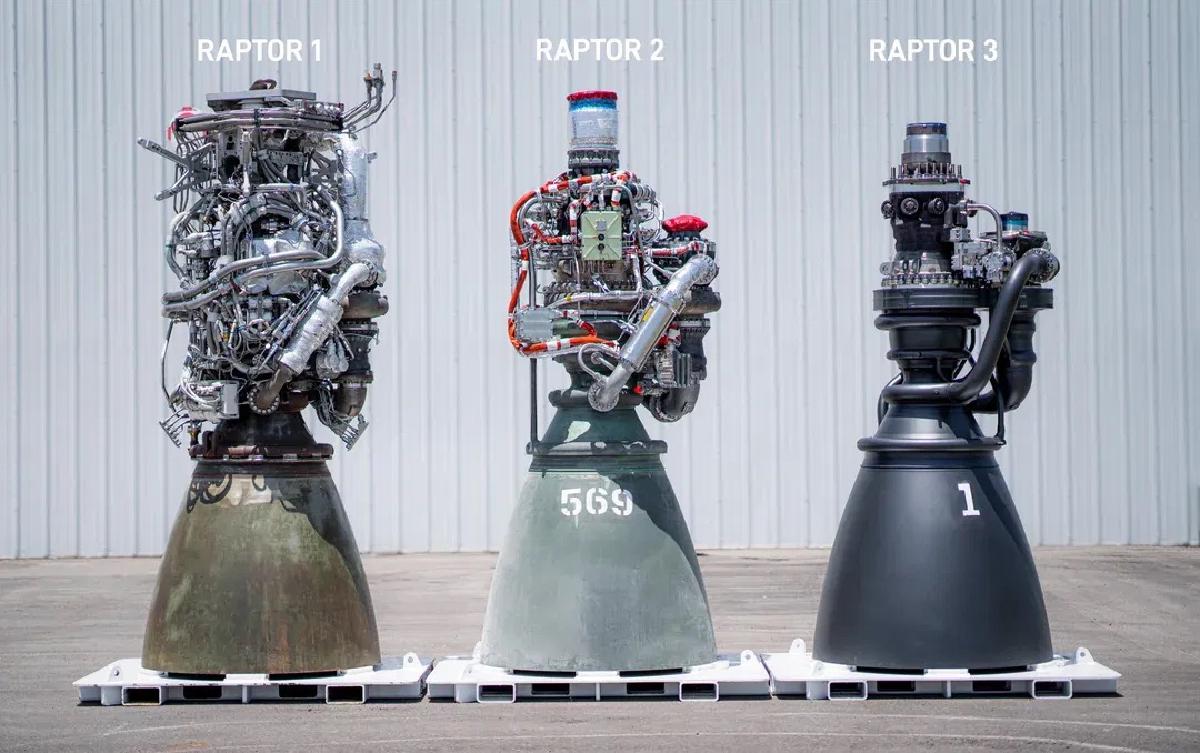
There’s a photo SpaceX released of its three generations of Raptor rocket engines, lined up side by side (it’s the one at the top of this post). I keep coming back to it.
Raptor 1, on the left, looks like a plate of chrome spaghetti. Pipes loop over pipes, sensors and wiring hang off every surface, and it’s hard to tell where one component ends and the next begins. Raptor 2, in the middle, is cleaner but still busy. Raptor 3, on the right, looks almost unfinished by comparison: a smooth, dark body with a handful of clean lines. If you didn’t know better, you might think someone forgot to bolt the rest of it on.
That photo is the best picture I’ve ever seen of something I’ve spent my whole career trying to do.
Simpler, and better on every number #
The clean-looking engine isn’t a cosmetic redesign. It’s the best engine of the three by every measure SpaceX published:
| Engine | Sea-level thrust | Engine mass | Engine + vehicle-side hardware |
|---|---|---|---|
| Raptor 1 | 185 tf | 2,080 kg | 3,630 kg |
| Raptor 2 | 230 tf | 1,630 kg | 2,875 kg |
| Raptor 3 | 280 tf | 1,525 kg | 1,720 kg |
That last column is the one I find most striking. Raptor 3 makes about 50% more thrust than Raptor 1, and the total mass it asks the rocket to carry dropped by more than half. Because so much plumbing moved inside the engine, it no longer needs the heavy heat shield its predecessors carried. Fewer parts to protect means fewer parts, period. (NASASpaceflight, citing SpaceX’s published specs)
Why we’re drawn to the complicated one #
Here’s a thought experiment. Show those three engines to people who don’t follow rockets and ask which one is the best. I’d bet most of them pick Raptor 1.
It looks like more engine. More pipes, more parts, more going on. We tend to read visible complexity as a sign of capability and effort. Raptor 3 looks like it does less, so it must be the cheap model.
The same instinct shows up everywhere. A dashboard with forty charts looks more serious than one with three. An architecture diagram covered in boxes and arrows looks more sophisticated than one you can explain in a sentence. A 60-page design doc feels like more work than a two-page one, even when the two-page one was harder to write.
That’s a trap, and it’s one of the reasons so few people put in the work to make things simple. Simplicity doesn’t advertise the effort behind it. If you do it well, nobody notices you did anything at all.
The complexity didn’t disappear. Someone absorbed it. #
Raptor 3 is not a simpler machine than Raptor 1 in any physical sense. It’s still a full-flow staged combustion engine running at enormous pressures. What changed is where the complexity lives. Much of the external plumbing was moved inside the engine body or eliminated. Cooling channels are built into the walls. Parts that used to be bolted together are now one piece.
That took years of engineering and two full generations of learning. The engineers had to understand Raptor 1 deeply enough to know which parts were essential and which were just scaffolding for problems they hadn’t solved yet.
This is the part people miss about simple systems. Simple is not the starting point. It’s what you get after you’ve wrestled with the complicated version long enough to really understand it. The first version of almost anything is a Raptor 1, and that’s fine. The mistake is stopping there and calling it done, or worse, being proud of how complicated it looks.
Antoine de Saint-Exupéry put it well: perfection is achieved not when there is nothing more to add, but when there is nothing left to take away.
What this looks like in software #
I saw this up close in the early days of Docker. Linux containers already existed. The kernel features were there: namespaces, cgroups, layered filesystems. But using them meant stitching together a pile of low-level tools and config that only a handful of people understood. It was a Raptor 1.
Docker didn’t invent a more powerful container. It took all of that machinery and hid it behind docker run. Overnight, millions of developers could use something that had been the domain of kernel experts. The complexity was all still there. Someone had just done the hard work of absorbing it so nobody else had to.
I see the same pattern now with GitOps. Plenty of teams have deployment pipelines that look like Raptor 1: a tangle of scripts, manual steps, and tribal knowledge that one or two people know how to run. GitOps replaces that with a simple idea: the desired state of your system lives in Git, and a tool like Argo CD makes reality match it. Want to deploy? Merge a pull request. Want to roll back? Revert a commit.
None of that is simple to build. Reconciling thousands of resources across hundreds of clusters is hard. But the person deploying their app shouldn’t have to know any of that. That’s the point.
The best software I’ve worked on doesn’t look impressive from the outside. It looks obvious. That’s how you know someone did the work.
Every junior engineer builds a Raptor 1 #
I see this pattern most often with junior engineers, and I say that with affection, because I was one too.
Junior engineers are excited to build things and try new technology. So a simple app ends up with Kafka, Elasticsearch, Redis, PostgreSQL, MongoDB, and RabbitMQ, when PostgreSQL alone, or PostgreSQL plus a cache, would have been fine. But where’s the fun in that?
They don’t know what they don’t know yet. Every component you add comes with a bill, and it keeps arriving long after launch:
- Operations. Every one of those services has to be up, monitored, backed up, and scaled. If any one fails, the whole system can fail with it. Six components can mean six single points of failure.
- Cost. Each one needs its own infrastructure, and often its own managed service or license.
- Brain share. Someone has to understand how every piece works and how they all interact. That knowledge is expensive to build and easy to lose.
- Security. With CVEs (Common Vulnerabilities and Exposures) coming out as fast as they are, every component is another thing to patch, test, and redeploy. Six components means six upgrade treadmills.
None of those costs show up in the demo. They all show up at 2 a.m. six months later.
Complexity as job security #
There’s a less innocent version of this, too. Some engineers make systems more complicated than they need to be on purpose.
Sometimes it’s about sounding smart. A system that’s hard to explain impresses non-technical coworkers and leaders. Sometimes it’s about job security. If you’re the only person who understands how everything fits together, the thinking goes, the company can’t afford to lose you.
That’s the Raptor 1 instinct turned into a career strategy. It optimizes for how the system looks, and for the person who built it, rather than for the people who depend on it.
Keep it simple, for whoever comes next #
I try to live by the KISS rule: Keep It Simple, Stupid. I want to build systems simple enough that anyone on the team can understand them, run them, and change them.
People sometimes ask whether that makes me afraid of losing my job. Maybe a little. But if a company values complexity over stability and maintainability, it probably isn’t the right company for me. And honestly, I don’t want to be the only person who knows how something works. That’s the person who gets the call in the middle of the night, or on vacation.
There’s a more personal reason, too. I’m not a genius, and my memory isn’t great. When I come back to something a year from now, I want it to be easy for me to understand. A simple system is a gift to my future self, and to everyone else who has to work on it after me.
Have you ever looked at code you wrote a few years ago and thought, why on earth did I do it that way? That’s common, and it’s a good thing. It means you’ve gotten better. If it ever stops happening, you’ve probably stopped growing.
Add complexity last, and write down why #
My rule is to start as simple as possible and stay that way for as long as possible. Complexity is a last resort, added only when the simple version genuinely can’t do the job.
When you do add it, document it. Not just what the system does, but why it’s built that way and what you tried first. The next person, or future you, needs to know which complexity is load-bearing and which is left over from a problem that no longer exists.
And no, code is not self-documenting. Code can tell you what it does. It can’t tell you why, what alternatives you rejected, or what will break if you change it. You need real docs.
The time I deleted 90% of an app #
Early in my career, shortly after starting a new job, I was handed an internal web app nobody liked. The person who wrote it had left the company. It was buggy, users complained constantly, and it had been passed around the team like a hot potato for years. Most people who touched it did the bare minimum and moved on.
Before writing a line of code, I spent a week getting to know it. I went through every open issue and read the code. Then I interviewed the users: what did they actually use the app for, which features mattered, and what was missing? It turned out to be a very simple app that didn’t need to do much.
By the end of that week I knew where the warts were. The biggest one: instead of using standard authentication and authorization libraries, the original author had written their own. Thousands of lines of code, full of bugs.
I had a choice. Fix it, or rip it out? Going back to my notes, I realized much of that code wasn’t even being used. It was a half-built framework of dead code, written for a future that never came. So I took it out, and the app immediately got easier to understand. A few more conversations with users showed that some of the code that was being used wasn’t needed either. It was overkill.
Two weeks later, I had removed about 90% of the code. After a lot of testing, I closed almost every open bug. The next release wasn’t just more stable, it was much faster too. A couple of releases after that, the complaints stopped completely.
The app never needed a hero. It needed someone to take the time to understand it, then cut it down to the minimum its users actually needed. And if the original author hadn’t tried to future-proof it with features it would never use, it probably wouldn’t have ended up in that state at all. There’s a name for that lesson: YAGNI, or You Aren’t Gonna Need It.
But you still have to ship #
I know this all sounds great in a blog post. In real life you have deadlines, customers waiting, and things that need to get out the door. Shipping matters too.
So ship something that isn’t perfect. That’s the great thing about software: we can keep improving it after it’s released. SpaceX didn’t wait for Raptor 3 before flying. Raptor 1 and 2 flew, and what they learned is what made Raptor 3 possible.
The key is to be honest about the rough edges. Write them down before you ship, then come back after the release and clean them up. Always leave the code a little cleaner than you found it. Over time, it gets there.
Starting clean is always better. But that isn’t always an option, and we have to accept that and keep improving anyway.
Build the Raptor 3 #
There’s an old line, usually credited to Blaise Pascal, apologizing for a long letter because he didn’t have time to write a short one. Simple takes more time, more understanding, and more discipline than complicated. It’s as much art as engineering.
So here’s my ask, for anyone building systems, products, or processes. Don’t stop at the version that works. Keep going until it’s the version that’s easy. Take on the complexity yourself so your users, your teammates, and future you don’t have to carry it.
It won’t look as impressive. Nobody will stare at it and marvel at all the pipes. But it’ll be lighter, stronger, and easier to live with. Just like Raptor 3.
Sources #
- Raptor 3 reveal and specs, NASASpaceflight, August 2024 (citing SpaceX)
- Header photo: SpaceX